Type 1-How to upgrade camera's firmware?
Applies to:
NP41F/N43SU/N44SU/N48PZ/N481U/N441U/N44PBD/N461W/N48PAU
1. Connect your NVR to a router with a network cable.
2. Make sure your computer is also connected to the same router as DVR/NVR. Besides, install the Device manager on the computer. Here is download link of the Device manager.
http://support.annke.com/document/XM/General/tool/device_manager.exe
3. Run software Device manager. It will detect the IP address automatically.
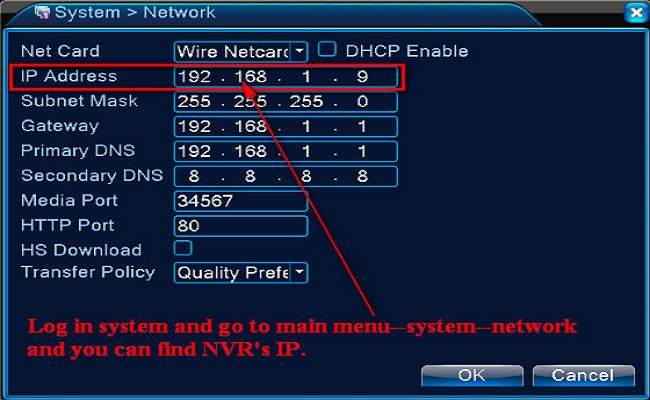
If your system is a 4 channels system, there will be 5 IP addresses. One is NVR's IP and other 4 are cameras' IP.
How to judge which one is NVR's IP and which one is the camera's IP?
Here is the method.
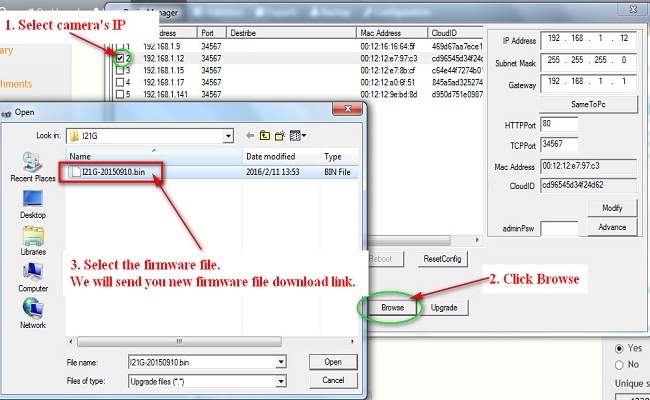
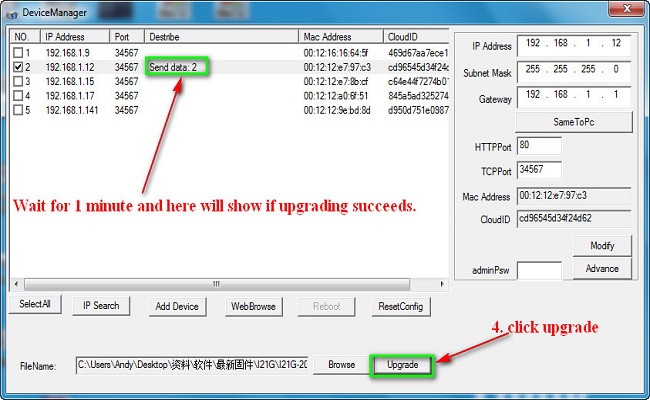
 4. Select one camera's IP and select the file to upgrade.
Was this article helpful?
Bu bilgiler sorununuzu çözmeye yardımcı oldu mu?
Still need help?
Uzman ekibimiz size yardımcı olmak için burada.