Type 3-How to upgrade DVR's system?
19 Aug 2026
363 views
Applies to:
DN81Q/DN41Q
Please check system current firmware build date. After upgrading, you can check if build date changed.
Steps:
1. Download the new firmware file to your computer.
2. copy the file to your USB hard drive.
3. Insert USB hard drive to USB port of DVR.
4. Go to Main Menu→ADVANCED→Upgrade.
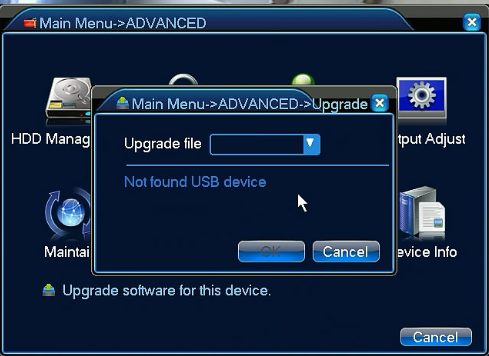
5. The system will reboot after the upgrade.

Was this article helpful?
Bu bilgiler sorununuzu çözmeye yardımcı oldu mu?
Thanks for your feedback!
Still need help?
Uzman ekibimiz size yardımcı olmak için burada.