XMeye - How to Confirm DVR‘s HDMI Port is Faulty?
Applies to: DH81NK/DH41NK/DM21O/DM31O/DL81A/DH81S/DH81NG/DN81NB/DM41G/DN41CJ/DN81BJ/DN61EC/DG81W/DG61X/DG41T/DT81DQ/DT41DC/DT61ER/DG41BE/DG81BE
If you find no images on your HD TV or HDMI monitor, please refer to the following instructions to check your HDMI port.
Note: Before the verification, you need to ensure the VGA port of the system is working correctly.
Step 1. Ensure your TV or monitor is in HDMI mode (not VGA or BNC mode).
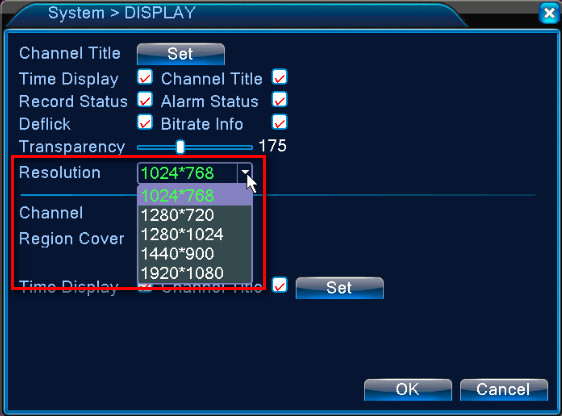
Step 2. Try the DVR’s video output resolution one by one.
Note: You are advised to try every resolution in the list, for it’s the most effective way to check the port.
Step 3. Change another HDMI cable.
Step 4. Change another HD TV if possible.
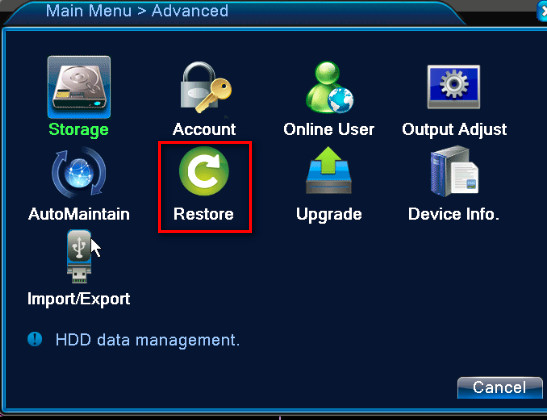
Step 5. Go to Main Menu -> Advanced -> Restore to factory reset your system.
Was this article helpful?
Bu bilgiler sorununuzu çözmeye yardımcı oldu mu?
Still need help?
Uzman ekibimiz size yardımcı olmak için burada.