XMeye - What to Do if All Cameras' Image is Abnormal?
Applies to:
DL41B/DL81B/DL41A/DL81A/DL41D/DL81D/DH81S/DH81X/DH81NG/DM41D/DM41A/DM81A/DN41D/DN81D/DN41S/DN41NA/DM41H/DM81H/DM21O/DM31O/DE41N/DE81N/DN81NB/DM81Z/DM61W/DG81CP/DG81CQ/DH81NK/DG81CR/DH41NK/DM41G/DN41CJ/DN81BJ/DN61EC/DG81W/DG61X/DG41T/DT81DQ/DT41DC/DT61ER/DG41BE/DG81BE
You can refer to these steps below.
1. Please go to the Main menu---System---General to change the video standard to have a try. If it doesn‘t work, change it back to the initial one.
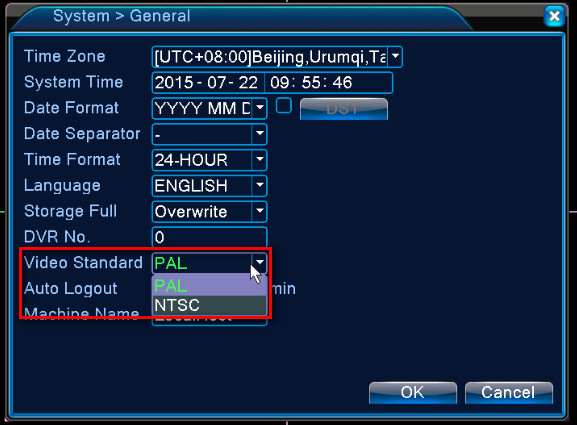
2. Connect only one camera to DVR, because maybe power has some problem and can‘t support all working or there is signal interference between cameras.
3. Change a monitor or TV to check if it is a problem with the monitor or TV, not DVR or camera.
4. Check if computer view or phone view faces the same issue.
Here is a method to view on a computer.
https://help.annke.com/hc/en-us/articles/360000249501-How-to-connect-DVR-NVR-on-computer-browser-
Here is a method to view on the phone.
https://help.annke.com/hc/en-us/articles/360000250041-How-to-connect-DVR-NVR-on-phone-app-xmeye-
5. Change another adapter to have a try.
Was this article helpful?
Bu bilgiler sorununuzu çözmeye yardımcı oldu mu?
Still need help?
Uzman ekibimiz size yardımcı olmak için burada.