XMeye - What to Do If The Cameras' Live View Box Does Not Occupy the Full Screen of Monitor?
20 Aug 2026
411 views
Applies to: DH81NK/DH41NK/DM21O/DM31O/DL81A/DH81S/DH81NG/DN81NB/DM41G/DN41CJ/DN81BJ/DN61EC/DG81W/DG61X/DG41T/DT81DQ/DT41DC/DT61ER
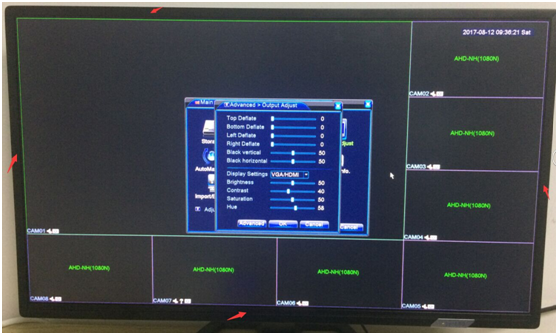
If you find the camera‘s live view box is too small to occupy the full
the screen of the monitor like this picture below shows, you can refer to these steps below to adjust.
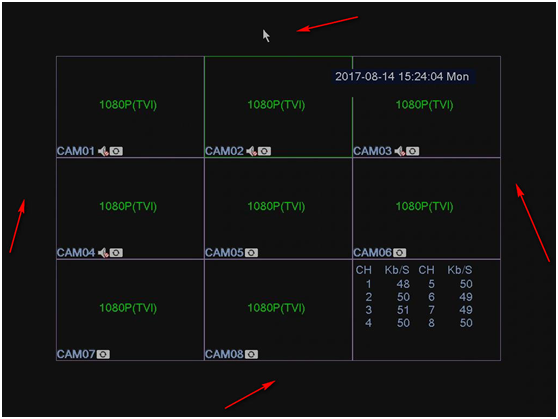
1. Please right-click the mouse and go to Main Menu-Advanced-Output Adjust.
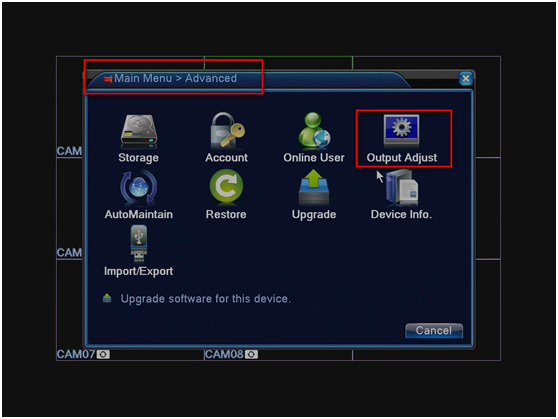
You can find the parameter of "Top Deflate", "Bottom Deflate", "Left Deflate", "Right Deflate" is not 0, it’s not correct.
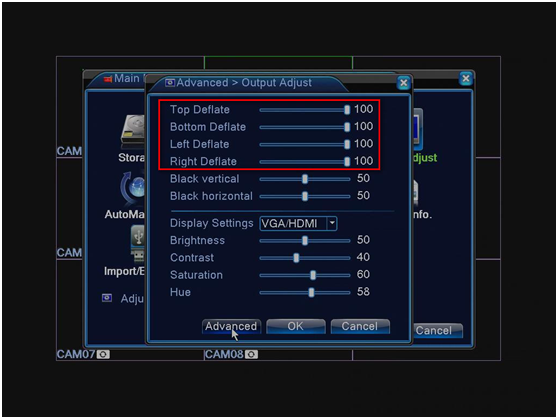
2. You can adjust these four parameters to 0. And then click OK.
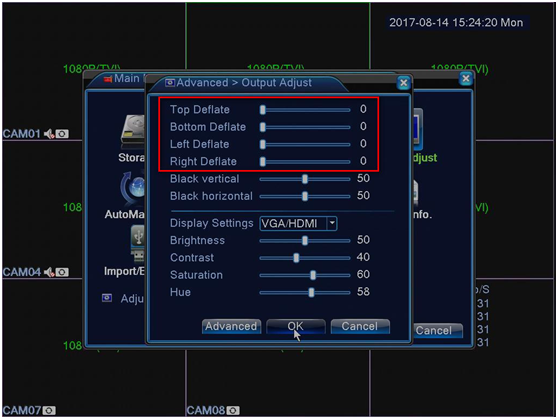
3. Now, you can see the cameras’ live view box is normal.
Was this article helpful?
Bu bilgiler sorununuzu çözmeye yardımcı oldu mu?
Thanks for your feedback!
Still need help?
Uzman ekibimiz size yardımcı olmak için burada.