 This icon indicates exclusive access for Premium users. You can unlock that feature by upgrading to Premium.
AlfredCamera provides various notification options, including Event notifications, battery notifications, and in-app notifications, helping you stay informed about your camera’s status and activities in real time, while also keeping you up to date with the latest product information—so you never miss anything important.
Types of AlfredCamera Notifications
AlfredCamera offers two types of notifications: Event Alert and Battery Alert. These notifications keep you informed in real-time about the camera status and event activities.
In addition, AlfredCamera provides In-App Notifications as a communication channel between us and you, ensuring that you stay updated with the latest news about new products, offers, feature updates, and feedback surveys. These notifications are designed to help you better understand and use various features while adjusting the frequency of push notifications to avoid interrupting your user experience.
Here’s how to manage these notification settings:
Turn on/off Detection Notifications for Individual Cameras
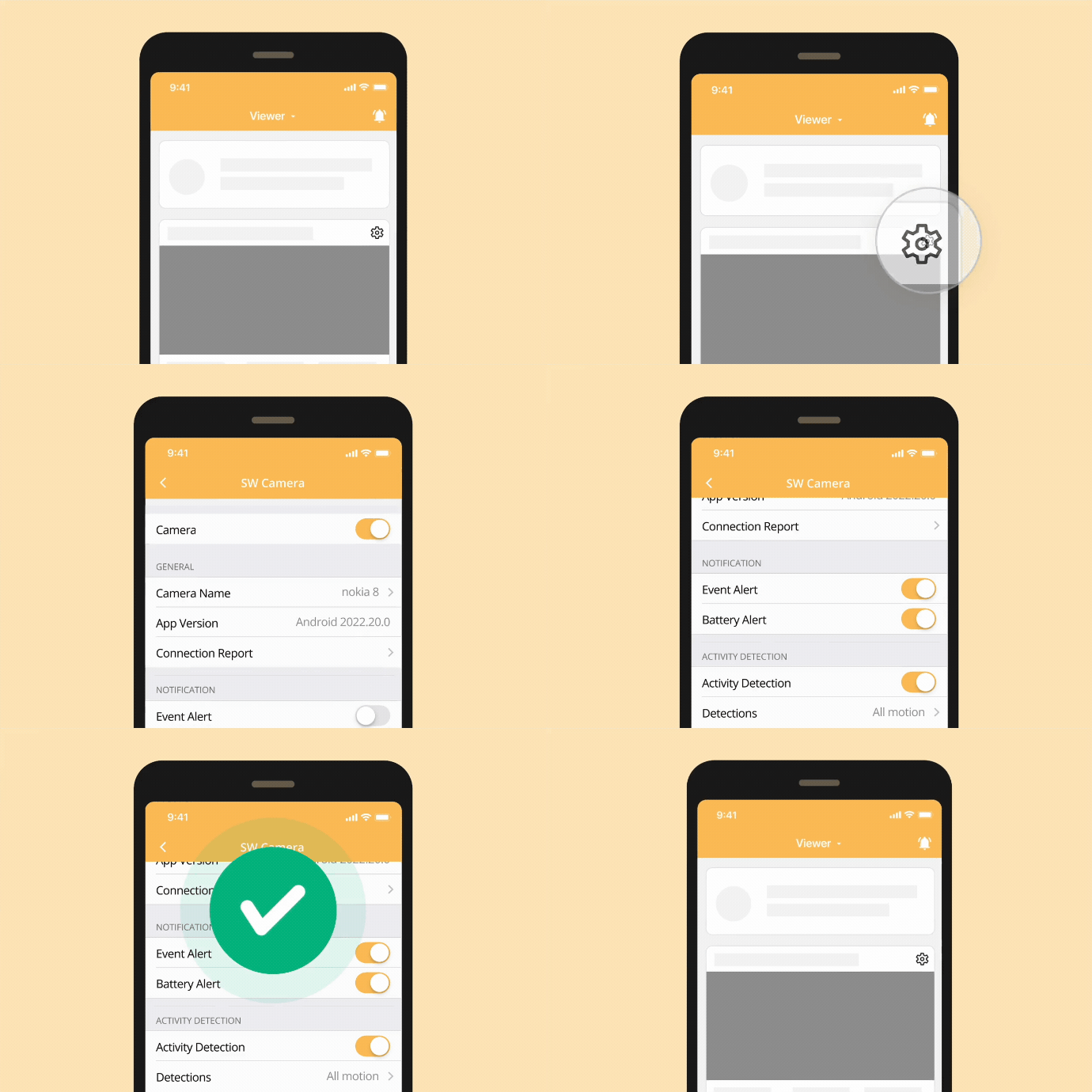
When you want to enable or disable Event Alert for a specific camera device, follow these steps:
- Tap the camera's settings wheel.
- Under [Notifications], toggle the switch to turn Event Alert on or off.
Turn on/off Specific Detection Type Notifications for Individual Cameras
You can enable or disable notifications for specific detection types on each camera. For example, you may want to receive only Person Detection notifications while turning off Sound Detection alerts. Follow the steps below:
- Tap the camera's settings wheel.
- Make sure the Event Alert under the Notifications section is enabled.
(If this switch is turned off, the camera will not send any Event notifications.)
- To adjust Activity Detection notifications:
- Tap [Detection].
- Tap the [Alert] under the detection type you want to configure.
- From there, you can turn notifications for that specific detection type on or off.
- To adjust Sound Detection notifications:
- Tap the [Alert] option under Sound Detection.
- From there, you can enable or disable sound-related notifications.
⚠️ Note:
- You must first enable the corresponding detection type in order to access its notification settings.
- Notification settings are configured per camera and do not affect your other devices.
- To use this feature, please ensure your devices meet the following version requirements:
- Camera Side:
- iOS 2025.2.0 or higher
- Android 2024.25.0 or higher
- AlfredCam 1.16.0 or higher
- Viewer Side:
- iOS / Android 2025.9.0 or higher
Turn on/off Battery Alert
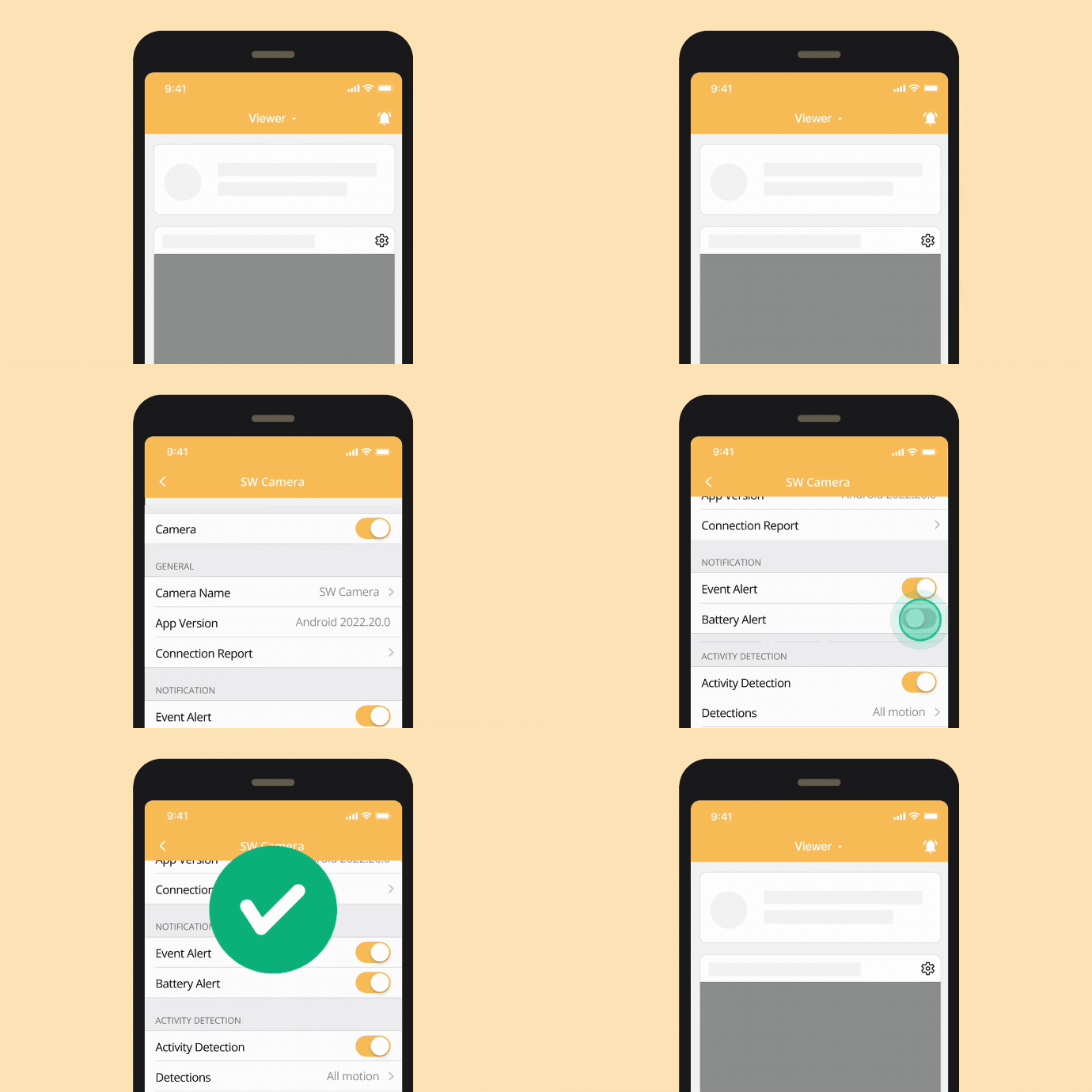
To prevent the camera from disconnecting or shutting down due to low battery, AlfredCamera sends a battery notification when the phone is not charging, has low battery, or is charging slowly. You can manage Battery Alert on Android devices by following these steps:
- Tap the camera's settings wheel.
- Under [Others], toggle the switch to turn Battery Alert on or off.
Turn on/off All Notifications
If you want to enable or disable all notifications, including Event Alerts and Battery Alerts, follow these steps:
- Tap the bell icon in the upper right corner of the home page.
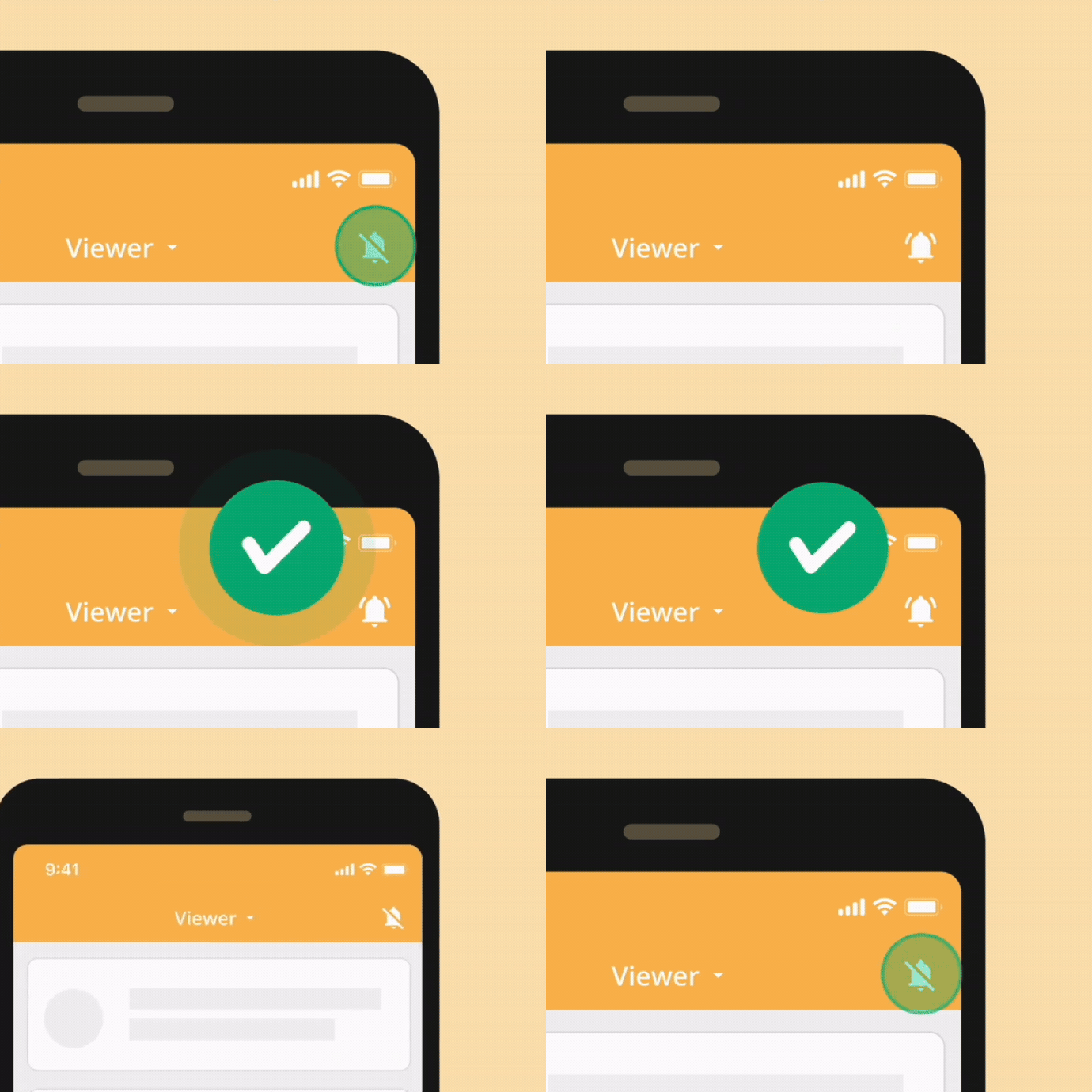
⚠️ Note: If you are using an Android device, you can customize the ringtone of notifications.
Temporarily Mute All Notifications
When needed, you can choose to mute all notifications temporarily. Follow the steps according to your device type:
-
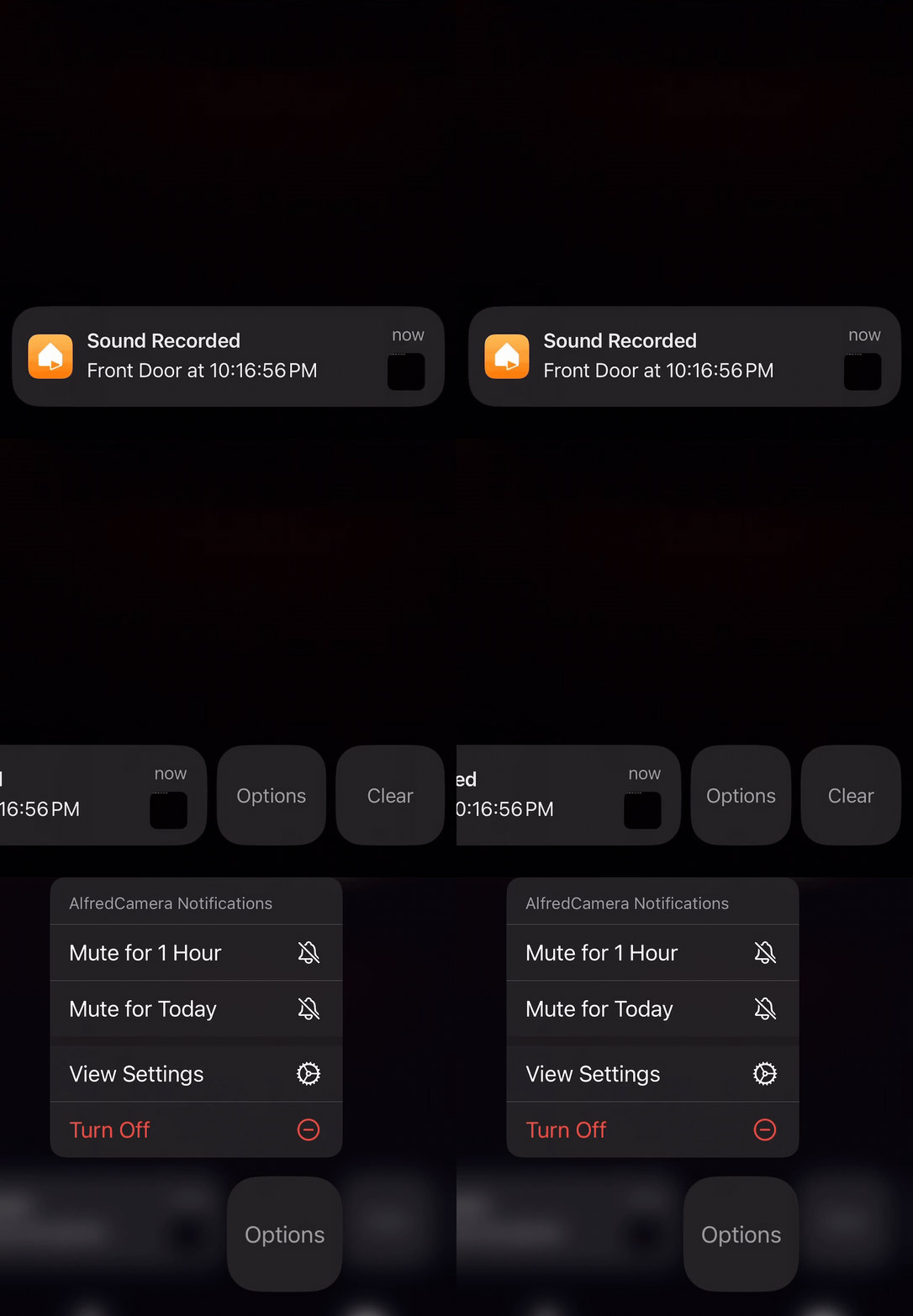
iOS Devices:
- Swipe left on the notification sent by AlfredCamera.
- Tap [Options].
- Choose the duration to mute notifications.
-
Android Devices:
- Tap the camera's settings wheel.
- Tap [Notifications].
- Choose the duration to mute notifications.
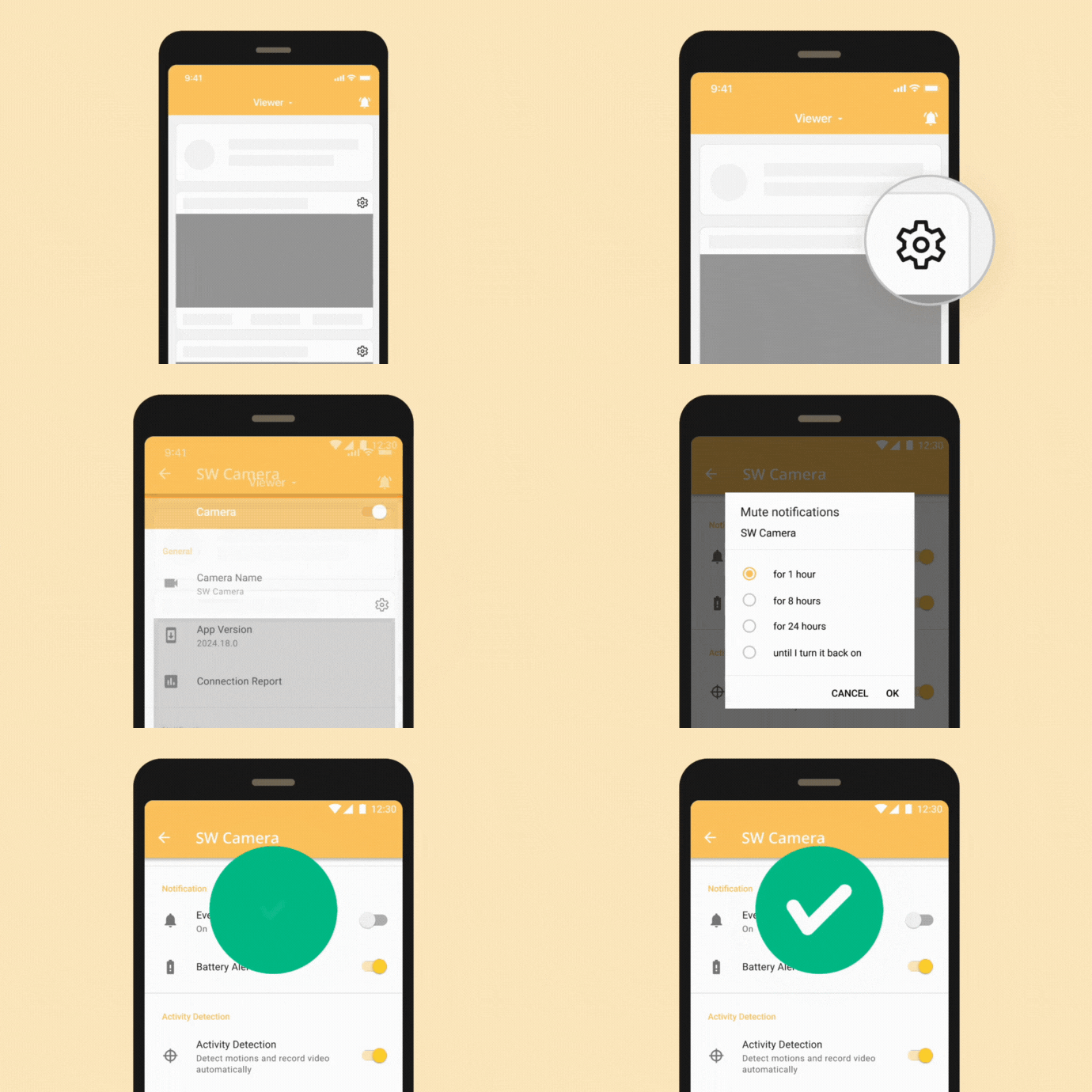
⚠️ Note: This setting will NOT turn off Battery Alert.
About Event Notification
AlfredCamera sends two notifications when an event is detected to help you stay informed in real-time:
-
"_______ (Event Type) Detected"
When the camera detects movement, person, pet, vehicle, or sound, you receive this notification. Tap the notification to view the Live session immediately, so you don't miss any activities.
-
"_______ (Event Type) Recorded"
Once the recording is complete and successfully uploaded to the Event Book, you receive this notification. Tap this notification to view the full video clip in the Event Book for easy review of the event details.
How to quickly watch Events through notifications?
When AlfredCamera detects an event and completes recording it, you will receive a notification. By pressing and holding the notification, you can directly view the snapshot or video of the event without entering the app, making it easier and faster to stay updated on the event, and enhancing convenience.
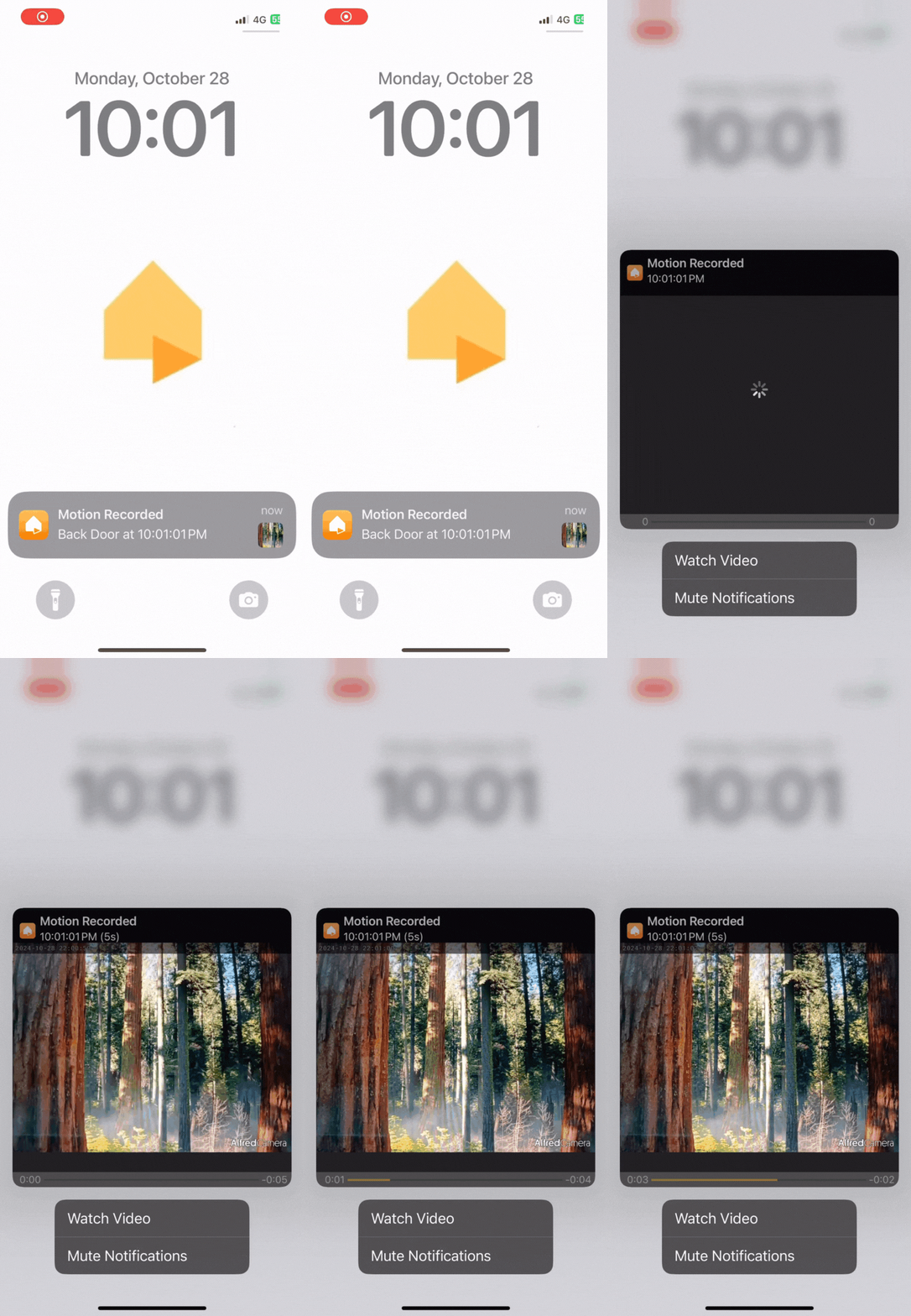
⚠️ Note: This feature is available only on iOS devices.
Turn on/off In-App Notifications 
All AlfredCamera users will receive In-App Notifications, including updates about new products, offers, feature updates, or feedback surveys. For Premium users, we offer more flexibility, allowing you to adjust the notification settings to better suit your preferences.
When you turn on specific notifications, you will receive communications from us as follows:
-
New Products & Deals: When new products or offers are launched, AlfredCamera will notify you immediately, ensuring you don't miss any opportunity!
-
New Features & Updates: We periodically release new features and provide exclusive tips, helping you discover the best features or settings tailored to your needs, improving your overall experience.
-
Feedback Survey: We invite you to participate in feedback surveys, letting us hear your voice and continuously improve AlfredCamera!
If you wish to turn on or off In-App Notifications, follow these steps:
- Tap the [More] tab
- Tap [Notifications]
- Adjust your In-App Notification settings
⚠️ Note: This setting will synchronize across all devices linked to your account.
🙋 Still have questions? Please contact us from the More tab in the app.