ANNKE SIGHT - Change Wireless Channel for Wireless NVR System
20 Aug 2026
399 views
Applies to:
NW41V/N441H/N441K/N28WEB/N441B/N441D/N441L/N44PAN/N44PAJ/N34WDB/N34WDD/N44WEB/N44WED/N44WEC/NW41V/N44WBD/N48WHP/N48WHR/WL400/WE400
Purpose:
When the ANNKE Wireless NVR system interferes with other wireless devices in the same router*, we can change the wireless channel on the ANNKE system to fix the issue.
* For example, the smart TV fails to work when the ANNKE system is working.
Steps:
- Log in to the system on a monitor/TV.
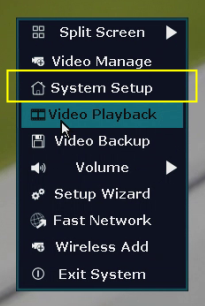
- On the system's live view screen, right-click the mouse to see a setting menu, go to [System Setup].
-
Navigate to [Network Setup--Wireless Setup], click on [Wireless Channel], select another number from its drop-down list. Click [Apply] to save the change.
Note: Channel 1/6/11 are recommended.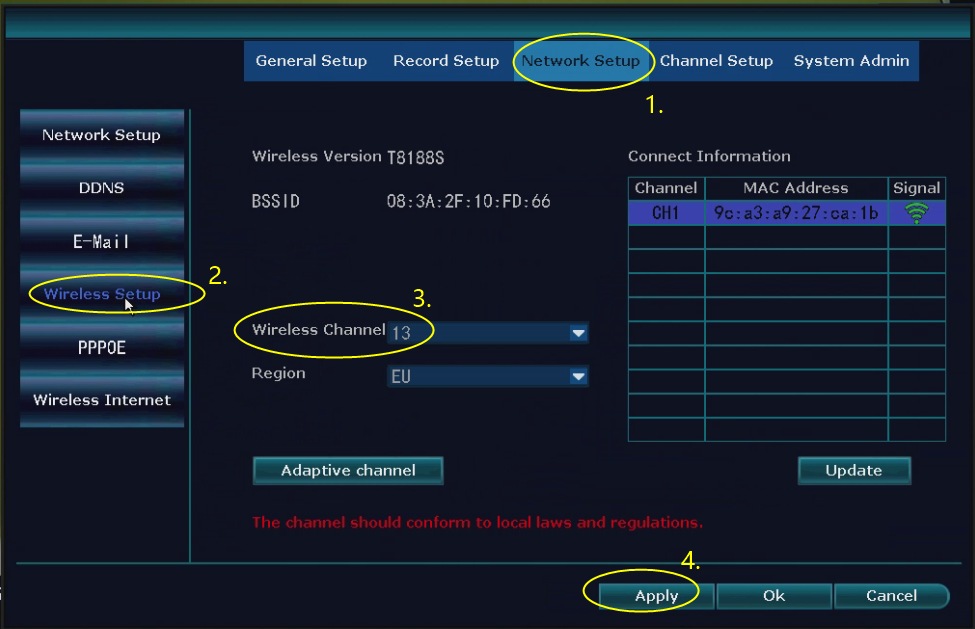
If this article is helpful to you, please click the "helpful" button below.
Was this article helpful?
Bu bilgiler sorununuzu çözmeye yardımcı oldu mu?
Thanks for your feedback!
Still need help?
Uzman ekibimiz size yardımcı olmak için burada.