ANNKE SIGHT - Connect Wireless NVR System to Router Wirelessly (For N48WHR)
20 Aug 2026
464 views
Applies to:
N48WHR
Purpose:
Besides the wired connection between NVR and router, the ANNKE system N48WHR also supports a wireless connection to the router. This article introduces the steps to connect it wirelessly.
Note: This ANNKE system only supports 2.4GHz wireless networks, not 5GHz.
Steps:
- Log in to the system on a monitor/TV.
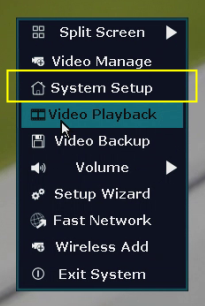
- On the system's live view screen, right-click the mouse to see a setting menu, go to [System Setup].
-
Navigate to [Network Setup--Wireless Internet], check the box [Wireless LAN], then we will see some available WiFi networks from the list of [Select network...].
Click one of the networks, then input its password in the box, click [Apply]. When it says 'WiFi connection successful', we made it.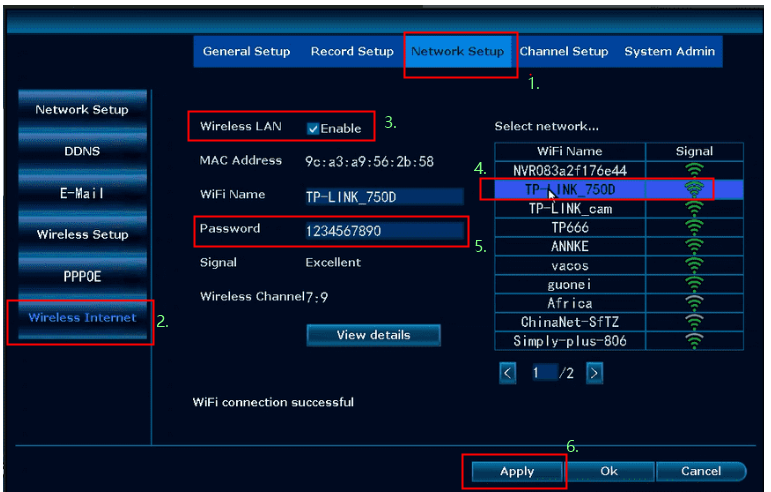
If this article is helpful to you, please click the "helpful" button below.
Was this article helpful?
Bu bilgiler sorununuzu çözmeye yardımcı oldu mu?
Thanks for your feedback!
Still need help?
Uzman ekibimiz size yardımcı olmak için burada.