Annke Vision - Adjusting Motion Detection Sensitivity on Annke Vision
Applies to: DT41Y/DT61Y/DT81Y/DN41R/DN61R/DN81R/DT41GB/DT81GB/DT41DB/DT61EQ/DW81KD/DW61LD/DT81DP/N48PI/N46PI/N44PI/N44PAM/N48PAW/N46PCK/N88PCH/N441Y/N481Y/I21AE/I21AF/I41DQ/I61DQ/I61DR/I61DS/I41HG/I41CS/S500/S300/FC200/NCK800/H800/H500
Purpose:
You can set the motion detection area sensitivity. There are three sensitivity levels for you to choose: low, medium, and high.
Introduction:
Low Sensitivity: Moving persons, large moving pets, and any other large moving objects in the motion detection area will trigger the alarm.
Medium Sensitivity: Moving small pets and any other medium moving objects in the motion detection area will trigger the alarm.
High Sensitivity: Moving insects, moving leaves, and any other small objects will trigger the alarm.
Steps:
1. Enter the Settings page of Live View.
2. Tap Alarm Notification to enter the Alarm Notification page.
3. Tap Motion Detection Sensitivity to enter the Motion Detection Sensitivity page.
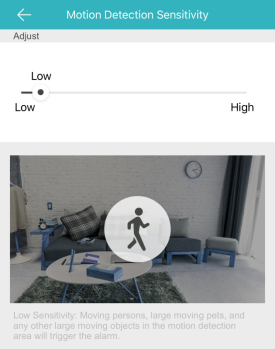
4. Move the slider to change the sensitivity.
The function is only supported by Wi-Fi doorbell.
Was this article helpful?
Bu bilgiler sorununuzu çözmeye yardımcı oldu mu?
Still need help?
Uzman ekibimiz size yardımcı olmak için burada.