Annke Vision - Configuring Multicast on ANNKE NVR
20 Aug 2026
413 views
Applies to: N48PI/N44PI/N46PI/N44PAM/N48PAW/N46PCK/N88PCH/N441Y/N481Y/NCK800/H800/H500
Purpose:
The multicast can be configured to realize a live view for more than 128 connections through the network for the device.
A multicast address spans the Class-D IP range of 224.0.0.0 to 239.255.255.255. It is recommended to use the IP address ranging from 239.252.0.0 to 239.255.255.255.
Before you start:
- You have logged in to your NVR.
- Click Menu > Configuration > Network.
Steps:
- Click More Settings tab to enter the More Settings interface, as shown below.
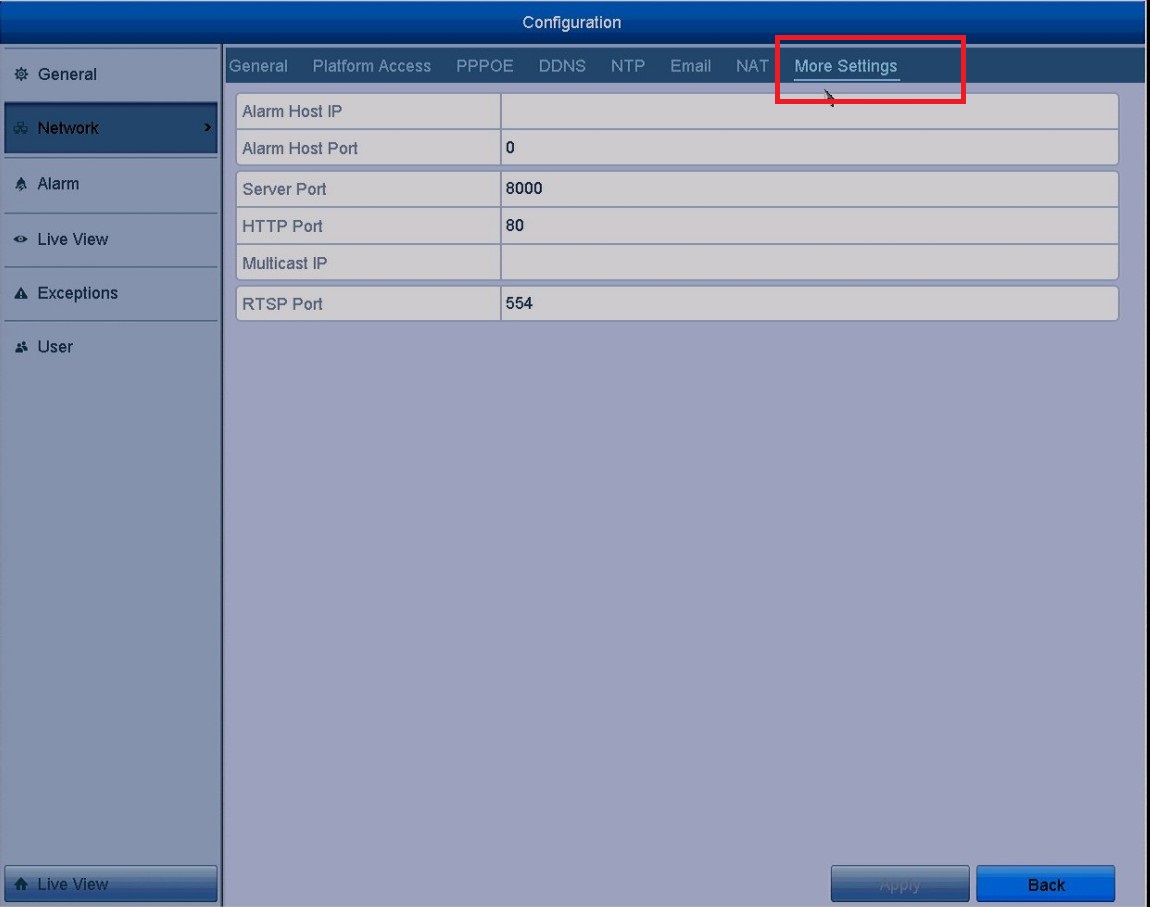
- Set Multicast IP, as shown below.
When adding a device to the Network Video Surveillance Software, the multicast address must be the same as the NVR’s multicast IP.
- Click the Apply button to save and exit the interface.
Note: The multicast function should be supported by the network switch to which the NVR is connected.
Was this article helpful?
Bu bilgiler sorununuzu çözmeye yardımcı oldu mu?
Thanks for your feedback!
Still need help?
Uzman ekibimiz size yardımcı olmak için burada.