ANNKE VISION-How to Turn on The PIR Alarm Light?( New S500 Series)
Applies to:
DVR: DW81KD, DW41LD, DW61LD
Camera: CT1BF, CT1DC, CT1DL, CT1DM, CR1BM, CR1BN, C51EN, CT1DS, CT1DR
Purpose: When the PIR light is turned on, false motion alarms can be reduced. Please refer to this article to find detailed instructions.
Steps:
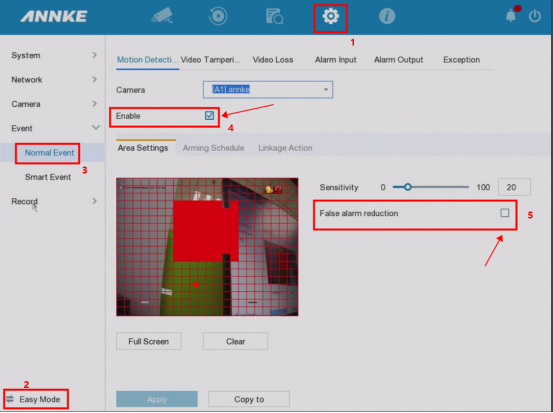
1. Switch the system to 'Expert Mode' on the left bottom corner.
2. Go to 'Normal Event' to enable 'Motion Detection' and 'False alarm reduction'.
3. Set up the detection area.
4. Go to 'Linkage Action' to enable 'Alarm light'.
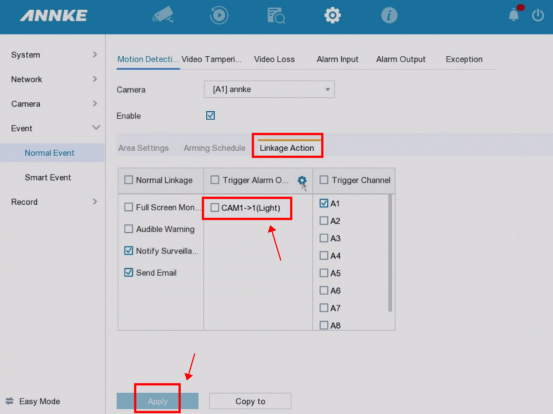
5. Click on 'Apply' to save the settings.
Notice:
For any other questions, please feel free to contact ANNKE technical support at support@annke.com by email.
If this article is helpful to you, please click the "helpful" button after you review it. Any comments would be appreciated.
Was this article helpful?
Bu bilgiler sorununuzu çözmeye yardımcı oldu mu?
Still need help?
Uzman ekibimiz size yardımcı olmak için burada.