Annke Vision - Playback External Files on Annke DVR/NVR
20 Aug 2026
429 views
Applies to: DT41Y/DT61Y/DT81Y/DN41R/DN61R/DN81R/DT41GB/DT81GB/DT61GB/DT41DB/DT81DB/DT61EQ/DW41JD/DW81KD/DW61LD/DT81DP/N48PI/N44PI/N46PI/N44PAM/N48PAW/N46PCK/N88PCH/N441Y/N481Y/S500/S300/FC200/NCK800/H800/H500
Purpose: Perform the following steps to look up and play back files in the external devices.
Steps:
- Enter the Playback interface. Menu>Playback
- Select the External File in the drop-down list on the top-left side. The files are listed in the right-side list. You can click the refresh button to refresh the file list.
- Select and click the triangle icon button to playback it.
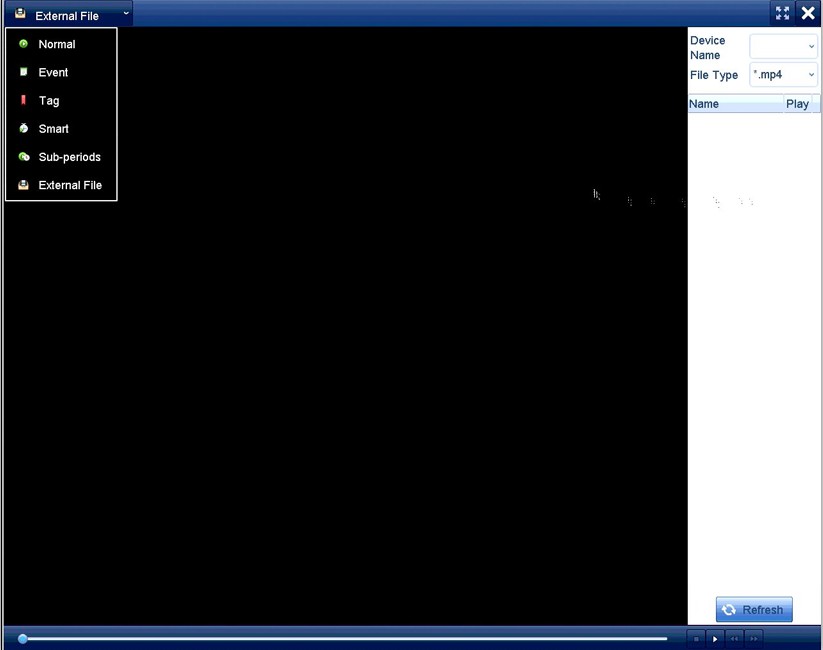
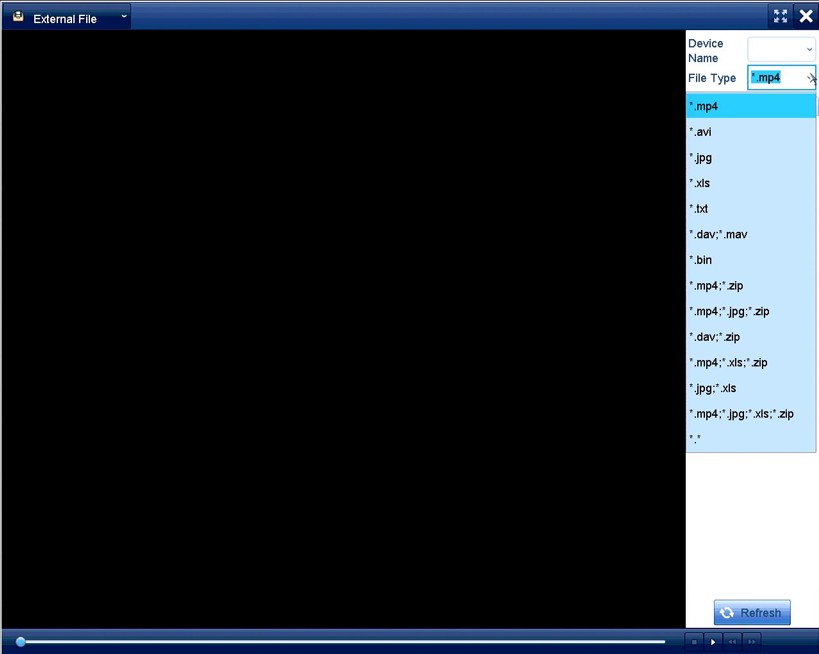
The interface of External File Playback
Was this article helpful?
Bu bilgiler sorununuzu çözmeye yardımcı oldu mu?
Thanks for your feedback!
Still need help?
Uzman ekibimiz size yardımcı olmak için burada.