Annke Vision - Reverse Playback of Multi-channel on Annke NVR
20 Aug 2026
443 views
Applies to: N48PI/N44PI/N46PI/N44PAM/N48PAW/N46PCK/N88PCH/NCK800/H800/H500
Purpose: You can play back record files of multi-channel reversely.
- Up to 16-ch (with 1280*720 resolution) simultaneous reverse playback is supported;
- Up to 4-ch (with 1920*1080P resolution) simultaneous reverse playback is supported;
- Up to 1-ch (with 2560*1920 resolution) reverse playback is supported.
Before you start:
- You should log in to your NVR.
- Click Menu > Playback > Normal
Steps:
- Enter the Playback interface.
- Check more than one checkboxes to select multiple channels and click to select a date on the calendar.
The picture below is the Synchronous Playback Interface: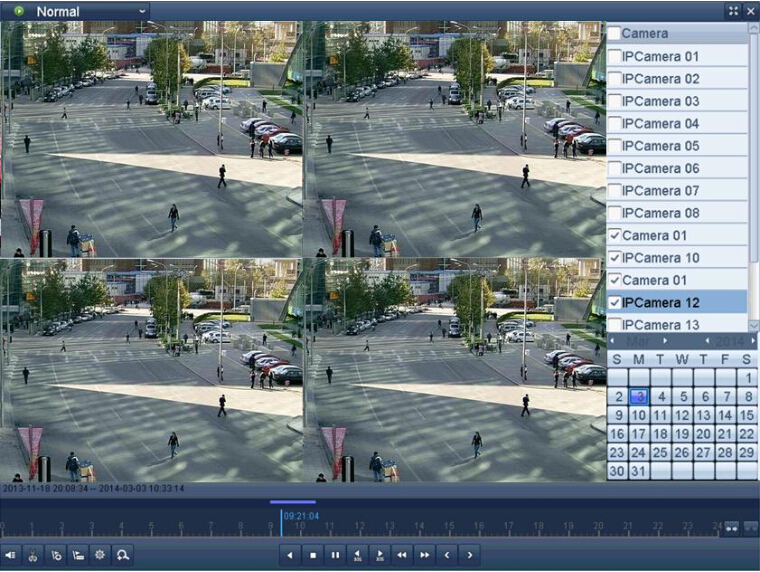
- Click
 to playback the record files reversely.
Note: The reverse playback is not supported series NVR.
Was this article helpful?
Bu bilgiler sorununuzu çözmeye yardımcı oldu mu?
Thanks for your feedback!
Still need help?
Uzman ekibimiz size yardımcı olmak için burada.