Annke Vision - Set up More Settings for Network on Annke DVR/NVR
20 Aug 2026
402 views
Applies to:
DT41Y/DT61Y/DT81Y/DN41R/DN61R/DN81R/DT41GB/DT81GB/DT61GB/DT41DB/DT81DB/DT61EQ/DW41JD/DW81KD/DW61LD/DT81DP/N48PI/N44PI/N46PI/N44PAM/N48PAW/N46PCK/N88PCH/N441Y/N481Y/S500/S300/FC200/NCK800/H800/H500
Purpose: You can set up the network setting on Annke DVR/NVR.
Before you start:
- You should log in to your device.
- Click Menu > Configuration > Network.
Steps:
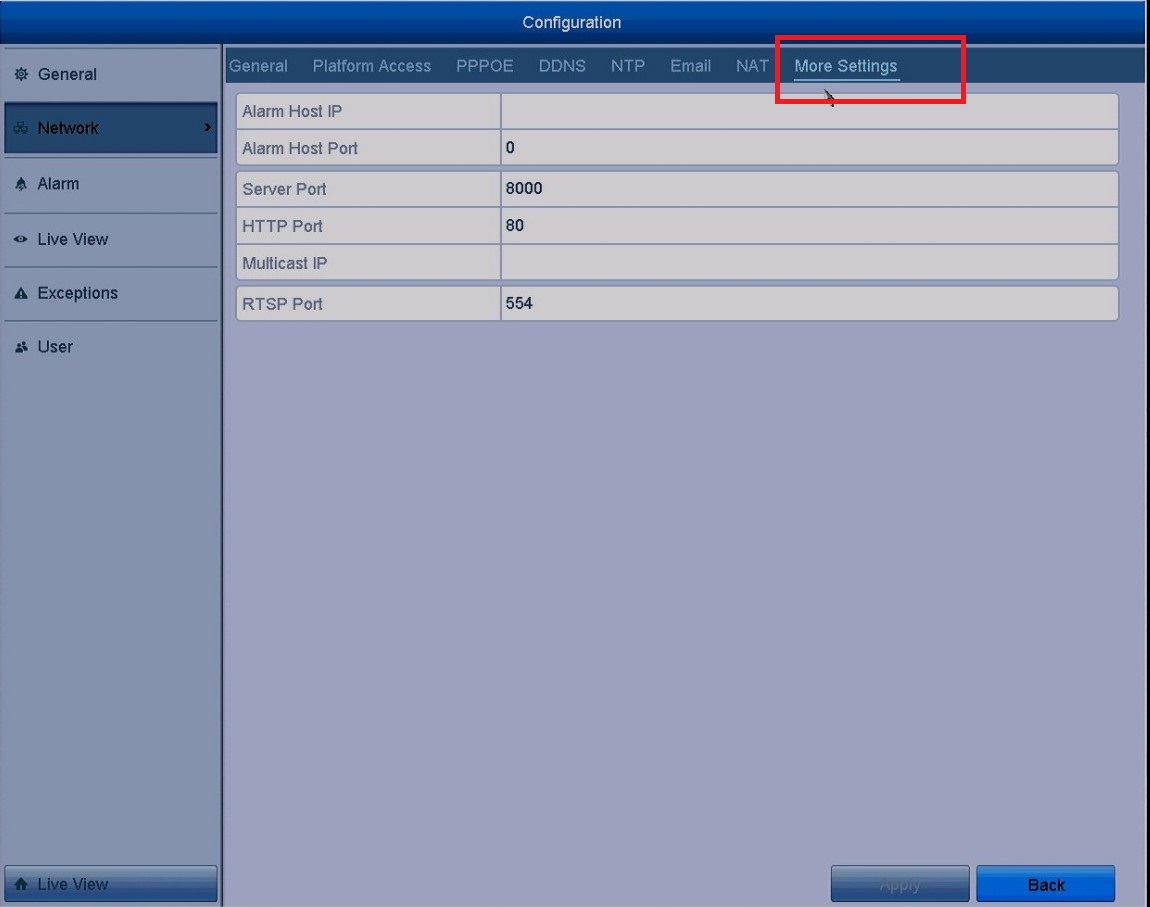
- Tap More Settings tab to enter the More Settings interface.
-
Configure the configurations.
-
Alarm Host IP/Port: After configured, the device will send the alarm event or exception message to the host when an alarm is triggered.
Note: The remote alarm host must have installed the CMS (Client Management System) software. - Multicast IP: The multicast can be configured to realize a live view for more than the maximum number of cameras through a network.
- RTSP Port: The RTSP (Real-Time Streaming Protocol) is a network control protocol.
The default RTSP port is 554. -
Server Port and HTTP Port: The default Server Port is 8000 and the HTTP Port is 80.
Note: The Server Port should be set to the range of 2000-65535 and it is used for remote client software access. The HTTP port is used for remote IE access.
-
Alarm Host IP/Port: After configured, the device will send the alarm event or exception message to the host when an alarm is triggered.
- Click the Apply button to save and exit the interface.
Was this article helpful?
Bu bilgiler sorununuzu çözmeye yardımcı oldu mu?
Thanks for your feedback!
Still need help?
Uzman ekibimiz size yardımcı olmak için burada.