Annke Vision - Set Up Privacy Mask on the Web Interface
20 Aug 2026
363 views
Applies to: DT41Y/DT61Y/DT81Y/DN41R/DN61R/DN81R/DT41GB/DT81GB/DT61GB/DW41JD/DW81KD/DW61LD/DT81DP/N48PI/N44PI/N46PI/N44PAM/N48PAW/N46PCK/N88PCH/S500/S300/FC200/NCK800/H800/H500/E500/E800/
I91BK/I81HB/I51DD/I51DL/I51DN/I51DM/I51DP/I91BF/I91BG/I91BM/I91BN/I91BL/I41BK/C500/C800
Purpose:
Privacy Mask allows you to cover certain areas on the live video to prevent certain spots in the surveillance area from being live viewed and recorded.
Steps:
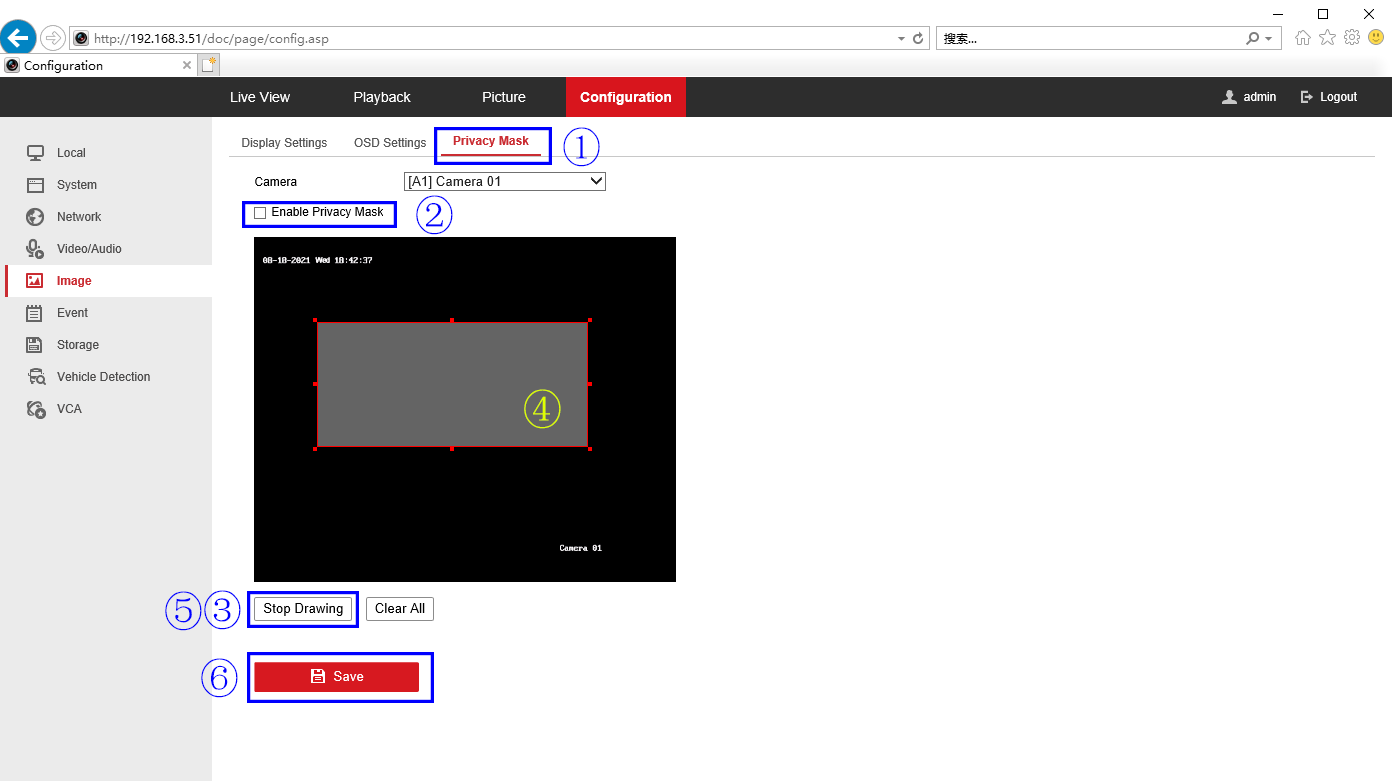
- Enter the Privacy Mask Settings interface.
- Check the checkbox of Enable Privacy Mask to enable this function.
- Click Draw Area.
- Click and drag the mouse in the live video window to draw the mask area.
- Click Stop Drawing to finish the drawing or click Clear All to clear all of the areas you set without saving them.
- Click Save to save the settings.
If this article is helpful to you, please click the "helpful" button after you review it. Any comments would be appreciated.
Was this article helpful?
Bu bilgiler sorununuzu çözmeye yardımcı oldu mu?
Thanks for your feedback!
Still need help?
Uzman ekibimiz size yardımcı olmak için burada.