Annke Vision - Settings on More Page on Annke Vision App
Applies to: DT41Y/DT61Y/DT81Y/DN41R/DN61R/DN81R/DT41GB/DT81GB/DT61GB/DT41DB/DT81DB/DT61EQ/DW41JD/DW81KD/DW61LD/DT81DP/N48PI/N44PI/N46PI/N44PAM/N48PAW/N46PCK/N88PCH/N441Y/N481Y/I21AE/I21AF/I41DQ/I61DQ/I61DR/I61DS/S500/S300/FC200/NCK800/H800/H500/C800/ C500/ B1200/NC400/ CZ500/ CZ400
Purpose: You can enable or disable the setting functions on more page.
Before you start:
Run the App, and have logged in the account before operating the function.
Click More Page>Settings
The settings page interface: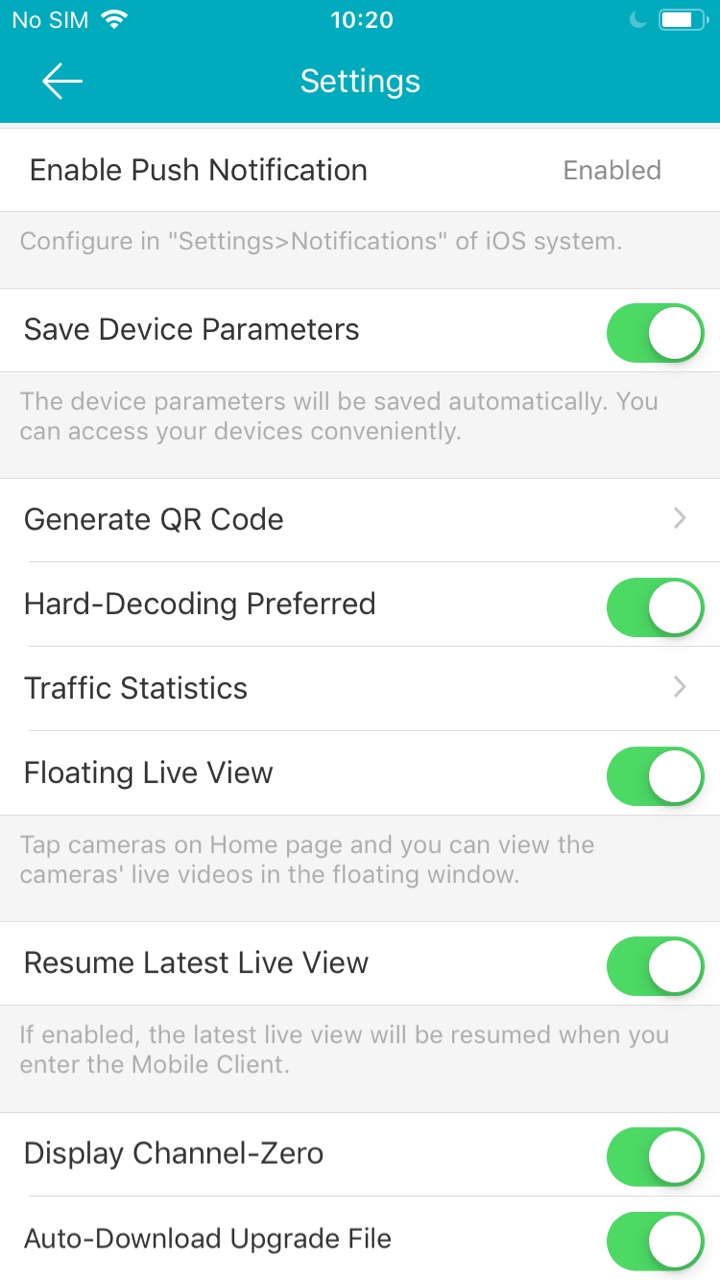
Enabling/Disabling Message Push Notification: Enable the message push notification function, you will receive the alarm notification when the alarm is triggered.
Save Device Parameters: Enable Save Device Parameters to save the device parameters such as the image encryption password.
Generate QR Code: You can generate one QR code which contains the information of up to 32 local devices.
Hard-Decoding Preferred: Provide better decoding performance and lower CPU usage when playing the HD videos during live view or playback.
Traffic Statistic: The network traffic consumed during live view and playback can be viewed.
Floating Live View: Enable the function, floating live view window(s) will be displayed on the Annke Vision page when you select one or more device(s).
Resume Latest Live View: Enable the function, you can resume the latest live view.
Display Channel-Zero: Enable the function, camera 0 will display in the device list.
Auto-Download Upgrade File: Enable the function, the client will download the upgrade file automatically in the Wi-Fi network for the device upgrading.
Was this article helpful?
Bu bilgiler sorununuzu çözmeye yardımcı oldu mu?
Still need help?
Uzman ekibimiz size yardımcı olmak için burada.