Annke Vision- What to Do If Guarding Vision Asks for The Encryption Code in Live View?
Applies to: DT41Y/DT61Y/DT81Y/DN41R/DN61R/DN81R/DT41GB/DT81GB/DT61GB/DW41JD/DW81KD/DW61LD/DT81DP/N48PI/N44PI/N46PI/N44PAM/N48PAW/N46PCK/N88PCH/S500/S300/FC200/NCK800/H800/H500
Introduction:
When the user is live to view the cameras on Guarding Vision, it is required to enter the encryption code sometimes. The encryption code is the verification code that the user sets up when activating the device for the first time, which can make your security system more secure. In this article, we will show you how to find the encryption code.
Steps:
1. Refer to the link below to find the encryption code first.
Annke Vision-How to Find The Encryption/Verification Code?
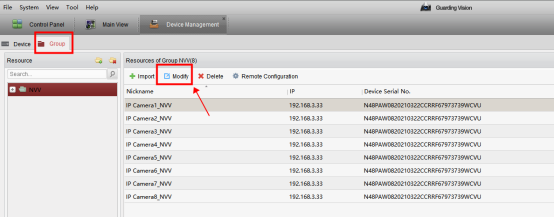
2. Go to 'Device Management→Group' and click 'Modify'.
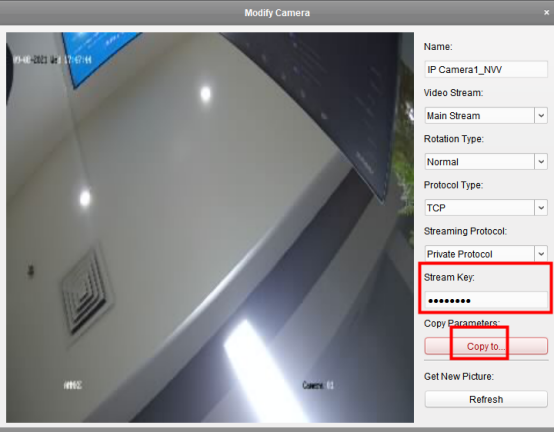
3. Type in the encryption code on ' Stream Key' and click ‘Ok’.
Note: If you have more than one camera, click 'copy to' to synchronize the configurations to other cameras.
If you have any other questions, please contact ANNKE technical support at support@annke.com by email.
If this article is helpful to you, please click the "helpful" button after you review it. Any comments would be appreciated.
Was this article helpful?
Bu bilgiler sorununuzu çözmeye yardımcı oldu mu?
Still need help?
Uzman ekibimiz size yardımcı olmak için burada.