Joylite - How to share the device with other people
Applies to:
I21AG_V7/I21AG_V8/I41CB_V2/I41CB_V3/I41DH
1. Please connect the camera to the app:
There are two methods for you, pls see below. If you have done this step, pls go to step 2 directly.
A. How to use phone to connect camera without ethernet cable
https://support.sannce.com/hc/en-us/articles/900000449206
B. How to set up camera with cable only for camera with ethernet port
https://support.sannce.com/hc/en-us/articles/900000448206
Please click the "Edit" button and then the " Share" button on the main interface.
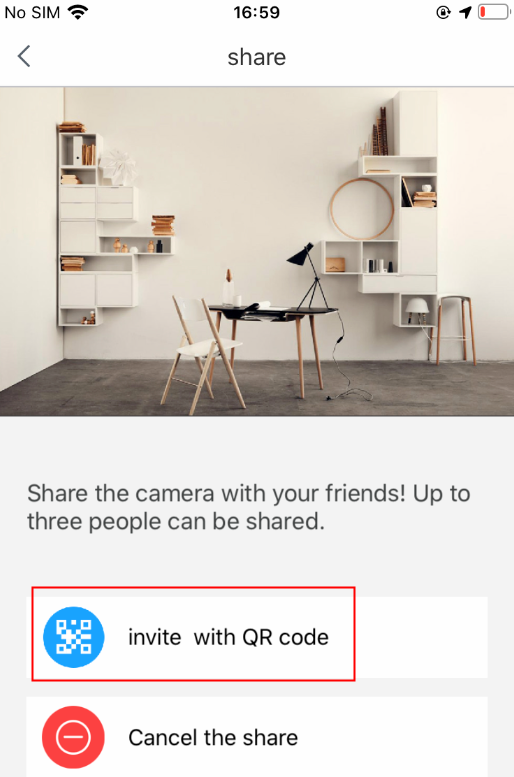
2. Please click " Invite with QR code".

3. You can ask the recipient to directly scan the QR code on your phone’s screen to add the device, or you can share the QR code in other ways.
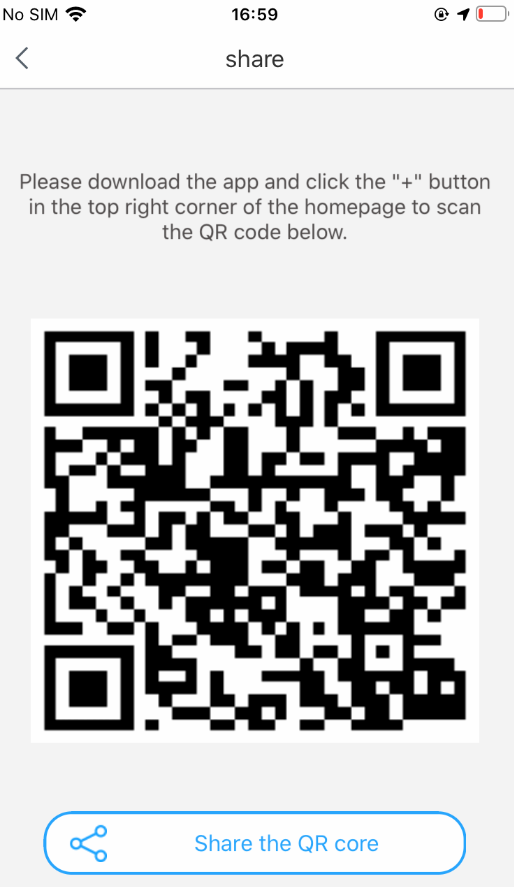
The following are the steps for the recipient to add the device:
Step 1: Click the "+" button on the main interface;
Step 2: Click "Connect a friend's camera";
Step 3: Scan the QR code to add.
4.After the device has been added to the recipient’s phone, the recipient can watch the live view, record the live video and take a screenshot. However, the recipient cannot control the device or adjust its settings.
5. If you want to cancel your sharing, please click the “sharing” button on the main interface, then click "Cancel the share".


Was this article helpful?
Bu bilgiler sorununuzu çözmeye yardımcı oldu mu?
Still need help?
Uzman ekibimiz size yardımcı olmak için burada.