Myannke - Device Settings on Myannke App
20 Aug 2026
464 views
Applies to: I41EJ
Introduction:
- The Device Settings Page features a number of different tabs that are just to the right of your cameras.
- You are able to switch between the different cameras to access the settings information for each of them.
Interface: 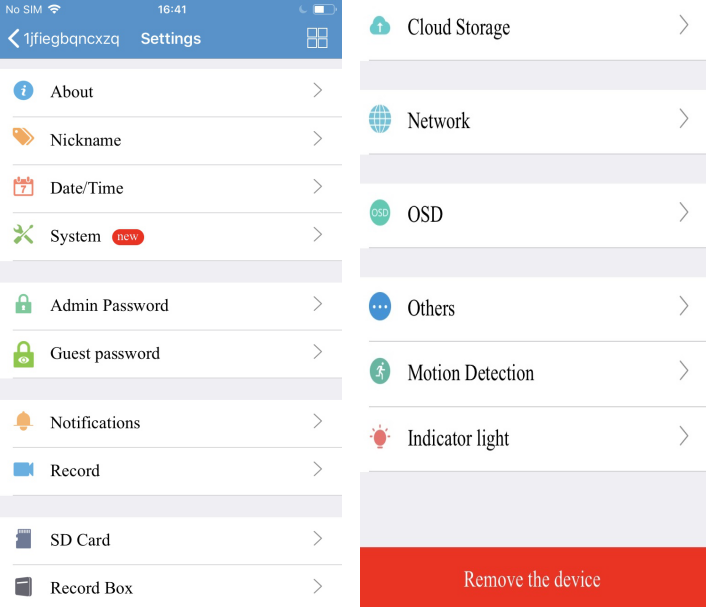
- About: View the Info including Model, Firmware Version and Device ID.
- Nickname: Enter a nickname for cameras.
- Date/Time: Set the date and time for cameras.
- System: View the new version, restore factory settings and restart the device.
- Admin Password: View and change the password.
- Guest Password: If you wish to grant someone access to your cameras, you can assign them a device guest password.
- Notification: Set up the notification of motion detection and alarm function.
- Record: Set up continuous recording and event recording.
- SD card: View the SD card status and active and format it.
- Cloud Storage: A function of online storage.
- Network: View network status.
- OSD: Manage what displays on the video screen.
- Other: Adjust the Speaker and Microphone.
- Motion Detection: Set up Smart Tracking and Sensitivity of Motion Detection.
- Indicator light: Set up the indicator light according to your need.
Note: You can Remove the devices on this page.
Was this article helpful?
Bu bilgiler sorununuzu çözmeye yardımcı oldu mu?
Thanks for your feedback!
Still need help?
Uzman ekibimiz size yardımcı olmak için burada.