[Shepherd][All versions] How to update the device pack of Shepherd?
20 Aug 2026
350 views
Question
When users want to use Shepherd to batch set cameras, the device pack must contain the camera model, or the parameters shown on the template page may not be consistent with the camera web UI. So, how to update the device pack of Shepherd?
Answer
Please follow the steps below to update the device pack of Shepherd.
1. Extract the .vdp file from .zip file downloaded from our website: https://www.vivotek.com/device_pack#downloads, and move it to the folder Shepherd2.
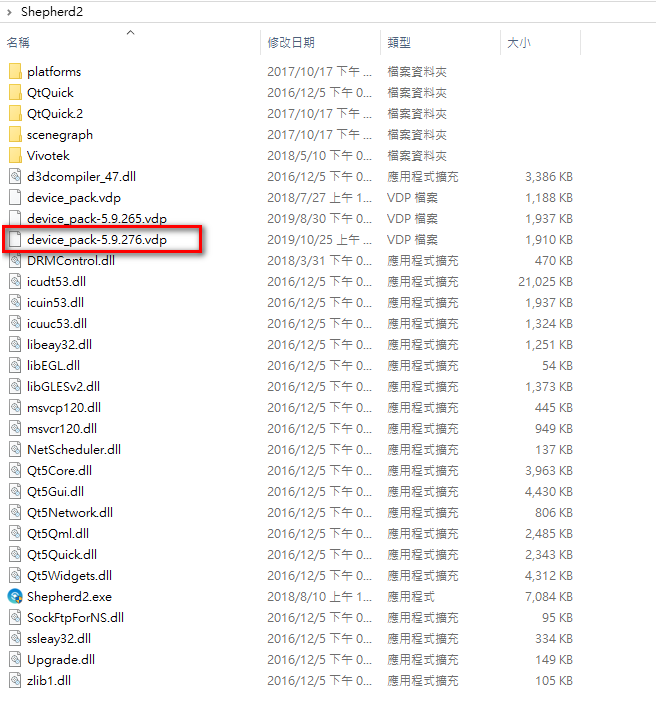
2. Executing Shepherd2.exe, it will automatically import the latest .vdp file.
3. The update process is complete.
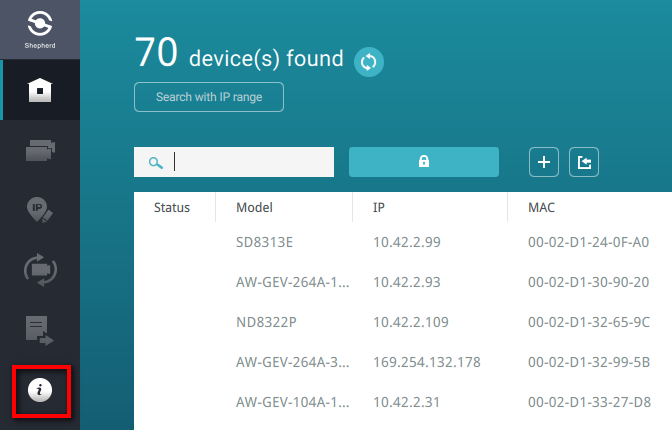
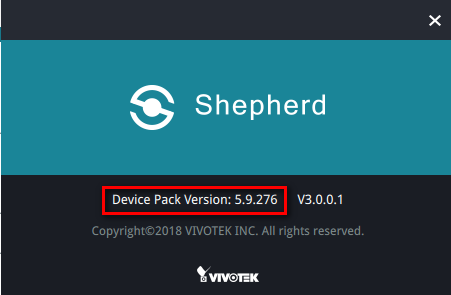
1. Extract the .vdp file from .zip file downloaded from our website: https://www.vivotek.com/device_pack#downloads, and move it to the folder Shepherd2.
2. Executing Shepherd2.exe, it will automatically import the latest .vdp file.
3. The update process is complete.
Was this article helpful?
Bu bilgiler sorununuzu çözmeye yardımcı oldu mu?
Thanks for your feedback!
Still need help?
Uzman ekibimiz size yardımcı olmak için burada.