Type 1-How to find the serial number, QR code and NAT status of system?
Applies to:
DL41B/DL81B/DL41A/DL81A/DL41D/DL81D/DH81S/DH81X/DH81NG/DM41D/DM41A/DM81A/DN41D/DN81D/DN41S/DN41NA/DM41H/DM81H/DM21O/DM31O/DE41N/DE81N/DN81NB/DM81Z/DM61W/DG81CP/DG81CQ/DH81NK/DG81CR/DH41NK/DM41G/DN41CJ/DN81BJ/DN61EC/DG81W/DG61X/DG41T/DT81DQ/DT41DC/DT61ER/DG41BE/DG81BE/NP41F/N43SU/N44SU/N48PZ/N481U/N441U/N44PBD/N461W/N48PAU
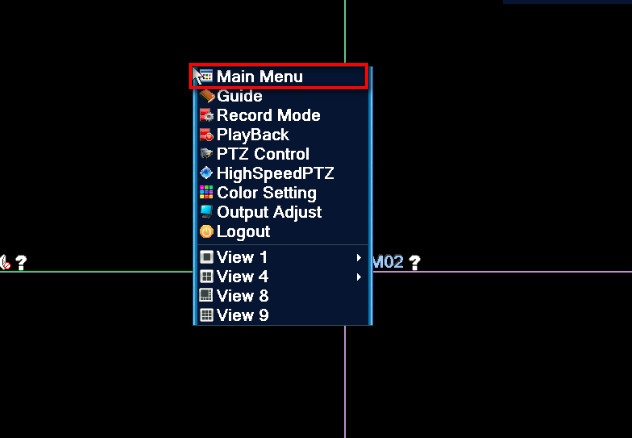
Step 1 Right-click mouse and click the main menu
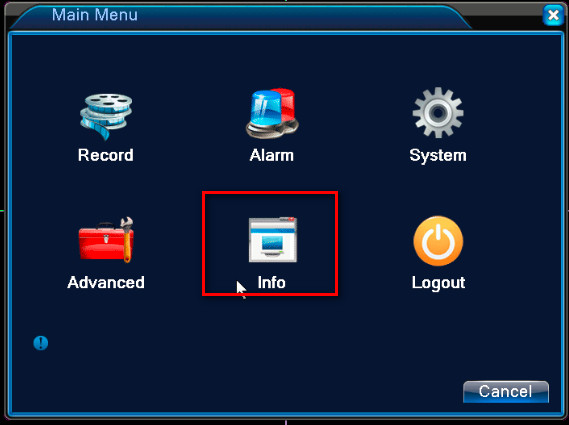
Step 2 select Info.
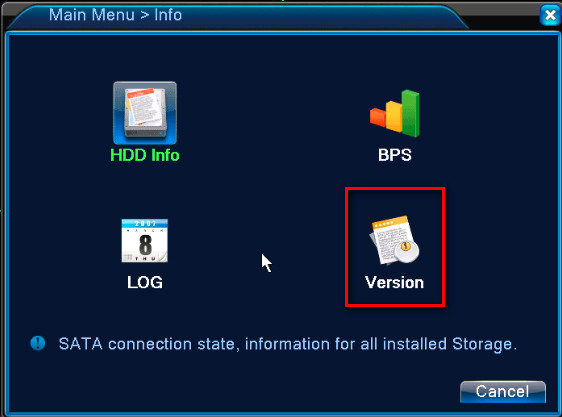
Step 3 Click Version.
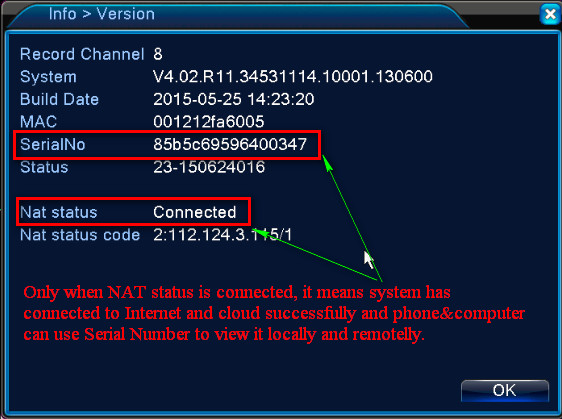
There is another way to check the serial number of the system.
Step 1. Turn on DVR and connect DVR to a monitor. Right-click the mouse and select guide.


 If you have not connected DVR to a monitor and can not log in system, there is another way to find the serial number.
1. Plug DVR to router by ethernet cable.
2. Get a computer that is connected to the same router as the DVR is connected.
3. Install the software on the computer. Here is the software. support.annke.com/document/XM/General/tool/device_manager.exe
4. Check if the software can detect the system‘s serial number.

Was this article helpful?
Bu bilgiler sorununuzu çözmeye yardımcı oldu mu?
Still need help?
Uzman ekibimiz size yardımcı olmak için burada.