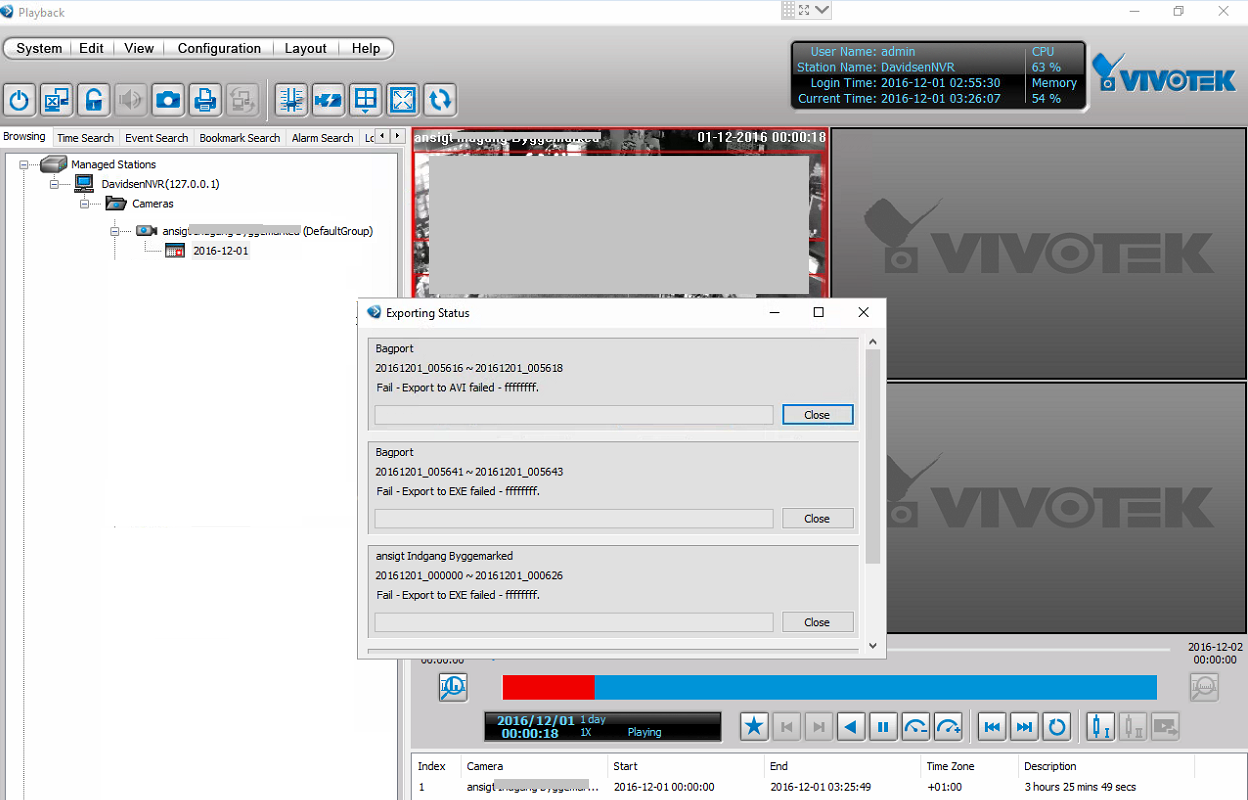
[VAST]Why does VAST playback show export failed ffffffff while exporting video clips?

Super Admin
07 May 2026
8 views
 

Question

Why I cannot export video clip from VAST playback? 
When I export video clip by clicking Mark I and II in playback, it shows "Fail - Export to AVI/EXE failed - ffffffff".
rtaImage_-_2021-05-16T212550.400.png

Answer

The export path was changed to system folder, e.g. C:\Program Files (x86)\VIVOTEK Inc\VAST\Client\Playback\Export. 
When your Windows account doesn't have Administrator privilege to run VAST Playback, you cannot export video clips to the system folder.

There are two ways to export video clips.
1. Change the export path to a non-system folder, e.g. default path C:\ProgramData\VIVOTEK Inc\VAST\Client\PlayBack. 
rtaImage_-_2021-05-16T212553.805.png 
 

Was this article helpful?

Bu bilgiler sorununuzu çözmeye yardımcı oldu mu?

Still need help?

Uzman ekibimiz size yardımcı olmak için burada.

New Ticket