XMeye - How to Reset POE IP Camera's Password to Factory Default?
Applies to: NP41F/N43SU/N44SU/N48PZ/N481U/N441U/N44PBD/N461W/N48PAU
If you created a new password for the POE IP camera but forgot it, here is a method for how to reset it to the factory default settings.
1. Connect the NVR to a router by a network cable.
2. Get a computer that is also connected to the same router as the NVR and download software from the below link to the computer to find the POE IP camera's IP.
http://www.sanncegroup.com/document/Computer%20software/Devicemanagement.zip
3. Install the reset tool. Here is the download link:
www.sanncegroup.com/document/XM/General/reset/ResetACTool.exe
4. Run ResetTool.exe on the computer and input POE IPC's IP address. Finally, click Reset.
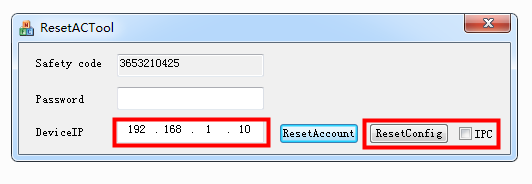
5. Wait for 20 seconds and there will be a window come up to let you wait for rebooting. Finally, you can access the camera with its default password. The default password of the camera is blank, so the camera could be accessed without a password.
If the tool does not work, please kindly contact technical support for more help.
Was this article helpful?
Bu bilgiler sorununuzu çözmeye yardımcı oldu mu?
Still need help?
Uzman ekibimiz size yardımcı olmak için burada.