XMeye - What to Do if Play Back on Monitor Has Some Problems?
Applies to:
DL41B/DL81B/DL41A/DL81A/DL41D/DL81D/DH81S/DH81X/DH81NG/DM41D/DM41A/DM81A/DN41D/DN81D/DN41S/DN41NA/DM41H/DM81H/DM21O/DM31O/DE41N/DE81N/DN81NB/DM81Z/DM61W/DG81CP/DG81CQ/DH81NK/DG81CR/DH41NK/DM41G/DN41CJ/DN81BJ/DN61EC/DG81W/DG61X/DG41T/DT81DQ/DT41DC/DT61ER/DG41BE/DG81BE/NP41F/N43SU/N44SU/N48PZ/N481U/N441U/N44PBD/N461W/N48PAU
If there is something wrong when playback on the monitor, such as freezing, video jump, try troubleshooting methods as below.
1. Check if playback on all channels has the same issue.
2. Check if playback on all recording of this channel have the same issue.
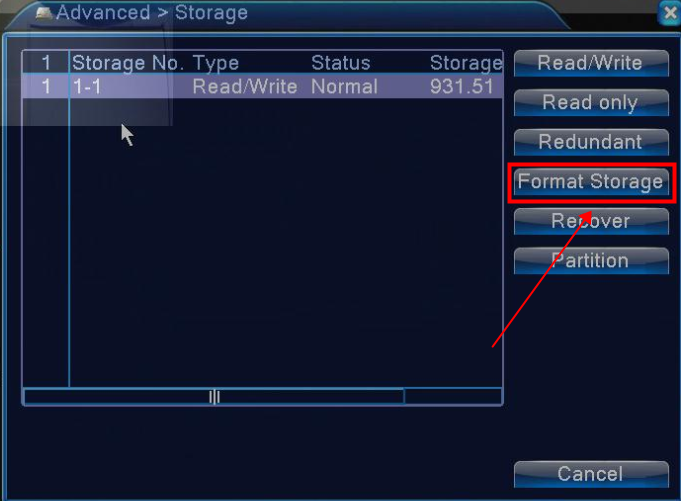
3. Format hard disk drive to erase everything in the hard disk drive. Record and check playback again.

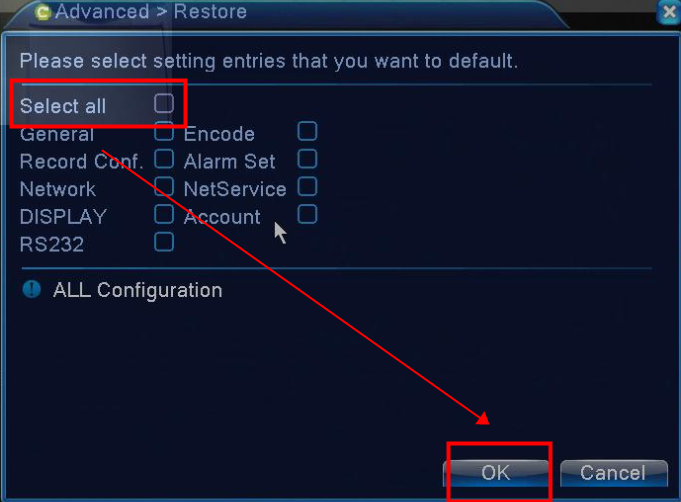
4. Restore the system to factory default. (it won't delete the video in the hard drive)

5. Send email to support@sannce.com with your system's model number where you can find it at the bottom of the recorder to ask a new firmware version to upgrade the system.
Was this article helpful?
Bu bilgiler sorununuzu çözmeye yardımcı oldu mu?
Still need help?
Uzman ekibimiz size yardımcı olmak için burada.